Lesson reading
live
50 min
Start with the lesson question, connect the representations, and test the model with evidence.
Inspect the opening phenomenon
Predict what changes, then name the evidence.
Apply in the lab
Name the evidence before reading the answer.
Read only what helps
Then use the lab and recall check.
More when needed
Transcript and resources stay available below.
Course progress
Intent, Accessibility, and Human Override
Decision challenge
Use the opening example to make a prediction, identify evidence, and explain which model supports it.
When Has a Robot Actually Stopped? Human Override Explained
When Has a Robot Actually Stopped? Human Override Explained
Lesson reading
live
50 min
Video script
published
Transcript fallback
available
courses/ai-robotics/modules/09-manipulation-and-human-robot-interaction/lessons/03-intent-accessibility-and-human-override/video-transcript.md
Trace the override before restarting
published
20 min
Mastery check
live
7 questions / 10 min
# Intent, Accessibility, and Human Override — descriptive transcript Complete non-video learning alternative. Original supervisory teaching model, not a safety system. Captions reproduce narration; visual descriptions explain information conveyed by motion. Thresholds are invented lab values. ## 00:00–00:16 · Which way will it go? **Visible mechanism:** A wheeled cart rolls up to a fork, then holds before choosing a station. Two dashed routes lead to A and B. A question mark signals that the destination is ambiguous. **Narration:** This delivery robot can reach either station. But can the person tell which one it intends to visit? A clear route is not enough. Good human robot interaction makes the goal understandable, and makes intervention usable. ## 00:16–00:37 · Show the goal first **Visible mechanism:** The destination label names B, and a cyan route with a direction arrow appears before the cart follows it. The lower card changes from known goal / expected path to seen motion / infer goal. **Narration:** Show station B and the intended route before moving. Predictability asks whether motion matches an expected path to a known goal. Legibility asks whether an observer can infer the goal from motion. Neither proves safety. Here, a destination label and route preview reduce the need to guess. ## 00:37–01:00 · More than a red light **Visible mechanism:** A color-only red circle is replaced by a labeled Cancel task button with a square symbol. A dashed focus outline, Enter key and traveling token illustrate keyboard activation. A separate text card says cancellation requested. **Narration:** A red light alone excludes people who cannot distinguish its color. A spoken warning alone can be missed. Pair clear words and symbols, provide keyboard controls, and expose changing status to assistive technology. Test with the people who will use the system. Extra channels are not a substitute for testing. ## 01:00–01:24 · Requested is not stopped **Visible mechanism:** A request token moves from person through supervisor to server. New dispatch becomes blocked immediately. A return token acknowledges acceptance; CANCELING appears. The cart continues along its track, then decelerates while a separate motion bar shrinks. **Narration:** Watch the handoff. The person requests cancellation. Our supervisor blocks new task commands immediately, but the current motion still needs to stop. The action server accepts the request and enters canceling. The robot decelerates. A cancel response is not a canceled result, and neither message alone measures physical motion. ## 01:24–01:46 · Check action AND motion **Visible mechanism:** The action card reports CANCELED for goal 1. An old zero-speed observation leaves the supervisor at MOTION UNKNOWN. A fresh zero-speed observation changes this to HELD, but dispatch remains blocked. A persistent warning distinguishes software cancel from an E-stop. **Narration:** In our simulation, held requires a canceled result for this goal and fresh zero speed evidence. If feedback goes stale, display motion unknown and keep dispatch blocked. Do not paint a reassuring stopped label. This software cancel control is not an emergency stop or a certified protective system. ## 01:46–02:10 · Do not resume by accident **Visible mechanism:** The held cart stays still while scene version 2 and plan version 1 mismatch. Recheck aligns both at version 2. Confirmation then changes to YES; the cart moves under new goal 2. An old goal-1 token is labeled IGNORE. **Narration:** After intervention, this lab requires a fresh state check and deliberate confirmation of the current goal. Releasing a control does not restart the robot. A changed scene invalidates the old plan. Recheck, confirm, then send a new goal. Do not reuse a late result from the previous goal as evidence for the new one. ## 02:10–02:32 · May it start again? **Visible mechanism:** Three cards report CANCELED, feedback age 2.0 seconds versus a 0.5-second limit, and confirmation NO. Name both missing conditions. Five quiet seconds are provided in the video; take as long as needed in this transcript. **Narration:** Your turn. Cancellation finished. The last zero speed report is two seconds old. This lab allows at most half a second. The person has not confirmed a restart. May the robot move? Name both missing conditions before the answer. ## 02:32–02:52 · Keep dispatch blocked **Visible mechanism:** The answer identifies fresh motion evidence and deliberate confirmation. Dispatch remains blocked until those checks are treated as satisfied in the illustrated continuation. NEW GOAL appears and the cart moves again. No real hardware is controlled. **Narration:** No. Get fresh motion evidence and explicit confirmation after the state checks pass. Make intent visible, intervention accessible, and restart deliberate. Try the event trace in the AI Robotics lesson, and follow Humanoid Hub for more mechanisms explained. **Untimed retrieval:** A two-second-old report exceeds the half-second limit, and restart is not confirmed. Either failure blocks dispatch. Obtain fresh evidence, recheck the current scene, and deliberately confirm the current goal; do not substitute a protocol response for measured physical state.
Reading lab
Connect the lesson's words, diagrams, graphs, evidence, and equations.
You press Cancel task. The screen turns green. The robot is still rolling. Which part of this interaction failed?
A useful robot must do more than find a valid route. People need to understand what it plans to do, intervene through controls they can use, and distinguish a received command from evidence about the machine. This lesson continues 9.2's distinction between an intended effect and an observed result.
By the end, you can:
Prerequisites: actions and feedback from module 4; state machines and timeouts from module 8; task evidence from 9.2. No robot, paid software or video is required. Time budget: 10 minutes concepts, 10 minutes trace, 20 minutes lab, 10 minutes retrieval and reflection.
Before: Sketch a robot at a fork leading to stations A and B. What must a person know before walking near the fork? Now predict whether “Cancel accepted” proves the robot is stationary.
During: Follow the eight numbered scenes. In scene 4, separate the closed dispatch gate from the cart's deceleration. In scene 5, ask what each evidence card actually proves. Pause at scene 7 before reading the answer.
After: Explain two independent reasons the cart must not restart in scene 7. Propose a control a person can use without distinguishing red from green or hearing narration.
Watch the complete Humanoid Hub tutorial. Read the descriptive transcript instead if preferred; each scene includes its visible mechanism and full narration. The retrieval pause is not a timed assessment.
For a delivery cart, destination B, an indicated route and an honest current status are more useful than a generic flashing light. Show the intended action early enough for the person to respond. If the destination changes, update the preview rather than leaving yesterday's arrow on screen.
Predictability: given the destination, is this the path an observer expects? Legibility: from the observed motion, can an observer infer the destination? These are different questions and can conflict. Neither a familiar path nor an expressive gesture proves a route is physically safe. The HRI research establishes the distinction; our station label and preview are an original design example, not a claim that one visual cue works for everyone. Dragan, Lee and Srinivasa
Retrieval pause: A straight initial segment could lead to A or B. Is it enough to know that the segment is short? Explain which question remains unanswered.
Use a named Cancel task button with a stop symbol and visible keyboard focus. Show words such as Cancellation requested, Canceling, Held and Motion unknown. Color may reinforce the distinction but should not be the only carrier. Provide caption/text alternatives to speech. A browser status message should also be exposed to assistive technology without unexpectedly moving focus. W3C color guidance, keyboard guidance, status guidance
More channels do not automatically make an interface accessible. Labels, reach, timing, hearing, vision, motor needs and cognitive load vary. Ask representative users to attempt the actual intervention and explain the resulting state. Do not infer a disability from a person's appearance. This lesson tests browser controls and event semantics, not a physical accessibility certification.
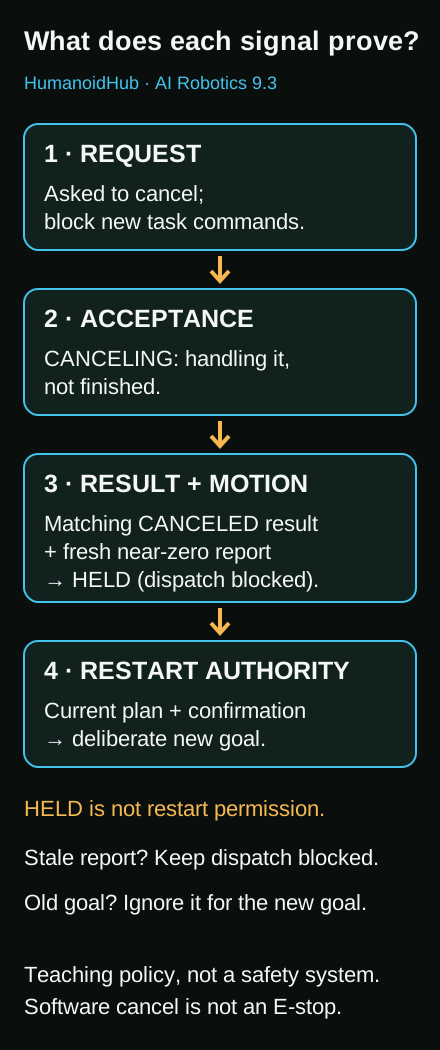
The diagram separates protocol messages from motion evidence. Read the equivalent four-stage table below; no color interpretation or video is required.
| Evidence | What it establishes | What it does not establish |
|---|---|---|
| Cancel request sent | The client asked to cancel a particular task | Receipt, acceptance or a stop |
| Cancel accepted / CANCELING | The server accepted cancellation and is handling it | That cleanup finished or velocity is zero |
| CANCELED result | The goal ended by cancellation in the action protocol | An independent measurement of physical velocity |
| Fresh zero-speed observation | The sensor report is recent and near zero under this model | Complete safety of the surroundings or correctness of every sensor |
ROS 2 distinguishes acceptance into CANCELING from terminal CANCELED. A cancel request can be rejected; feedback and results must be associated with the right goal. The separate dispatch gate and HELD state below belong to our teaching model, not the ROS goal-state enumeration. ROS 2 Actions
When the person cancels, the supervisor immediately refuses new task commands. The current motion can persist while the request travels and the robot decelerates. Never relabel “request sent” as “physically stopped.”
Our fictional simulation uses maximum feedback age 0.5 s and a near-zero speed tolerance less than 0.01 model units/s. These are lab choices, not hardware settings. Initial setup assumes a known stationary cart and a checked scene before the first confirmation.
| Event | Action state | Supervisor / dispatch |
|---|---|---|
| Confirm station B; start goal 1 | EXECUTING | RUNNING / enabled |
| Request cancellation | Still EXECUTING | STOP_REQUESTED / blocked |
| Server accepts cancellation | CANCELING | CANCELING / blocked |
| CANCELED result; measured speed 0.2 | CANCELED | Not held / blocked |
| Fresh speed 0 for goal 1 | CANCELED | HELD / still blocked |
| Release the control | CANCELED | HELD / still blocked |
| Change scene version 1 to 2 | CANCELED | Old plan invalid / blocked |
| Recheck current scene; confirm; resume | New goal 2 EXECUTING | RUNNING / enabled |
| Late result for goal 1 | Goal 2 unchanged | Old message ignored |
“Held” deliberately does not mean “allowed to restart.” The toy restart rule requires all five checks: HELD supervisor, matching CANCELED result, fresh zero-speed evidence, plan matching the current scene, and deliberate confirmation. A stale report can invalidate the held classification. If communication is lost, use Motion unknown and keep dispatch blocked; the UI does not magically stop the robot.
At model time 3.0 s, the last zero-speed observation was at 1.0 s. Age = 3.0 − 1.0 = 2.0 s. Since 2.0 > 0.5, the report is stale. A CANCELED result cannot make it fresh. Without deliberate confirmation, two conditions are missing. Obtain current evidence and repeat the policy checks; do not merely turn the indicator green.
The browser simulation sends no commands to physical hardware. Its cancel control depends on ordinary software and messages. Do not wire it to a motor or substitute it for protective equipment. Real systems need application-specific risk assessment, engineered protection and qualified verification. An emergency stop is itself a complementary protective measure, not a guarantee that hazards cannot occur. The cited manufacturer documentation is an example of this distinction, not a reset or operating procedure for learners. Universal Robots manual
Use the simulation lab and paper alternative provided with this lesson. Predict a trace before running it. Explain the first failed condition using the event time, goal identity and observation, not only a color.
The transferable pattern is make intent understandable → make intervention usable → acknowledge honestly → verify state → restart deliberately. It is a supervisory design pattern, not a certified safety mechanism. Next, module 10 asks which robot capabilities should be learned from examples and how to evaluate them.
Further source details and applicability limits are included below.
Retrieved 2026-10-10. Original instructional synthesis for a simulation-first beginner lesson. Sources are cited and paraphrased; no source screenshots, video, diagrams or long passages are reused. The toy controller, event traces, questions and motion artwork are original. This is not a conformity assessment, legal interpretation or hardware operating procedure.
| Key | Primary source / publisher / canonical URL | Supported claim | Limit and reuse decision |
|---|---|---|---|
| hri-legibility | Dragan, Lee and Srinivasa, Legibility and Predictability of Robot Motion, ACM/IEEE HRI 2013; Carnegie Mellon Robotics Institute: https://publications.ri.cmu.edu/legibility-and-predictability-of-robot-motion | Inferring a goal from observed motion differs from predicting motion given a goal; the properties can conflict. | Original authors' institutional abstract inspected. Paper PDF retrieval failed; no quantitative experimental claims, copied figures or claimed review of full methods. Link and short paraphrase only. Our route preview is a design example, not a reproduction of the paper's optimizer. |
| ros-actions | Actions, ROS 2 design: https://design.ros2.org/articles/actions.html | Cancellation request, acceptance into CANCELING, and terminal CANCELED are distinct. Feedback is goal-specific; result status does not independently measure physical velocity. | This dated design document specifies middleware semantics, not safety-rated motor stopping. Supervisor HELD/UNKNOWN states and freshness thresholds are ours, not ROS standard states. Link and paraphrase only. |
| wai-color | W3C WAI, Understanding SC 1.4.1 Use of Color: https://www.w3.org/WAI/WCAG22/Understanding/use-of-color.html | Color alone must not carry meaning; visible words/shapes can provide redundant distinction. | Informative WCAG explanation for web content, not robot hardware certification. Original control design; no copied media. |
| wai-keyboard | W3C WAI, Understanding SC 2.1.1 Keyboard: https://www.w3.org/WAI/WCAG22/Understanding/keyboard.html | Pointer actions should have keyboard equivalents, subject to criterion exceptions. | Applied to this browser simulation. Does not prove physical switches, screen readers or all assistive technology work. Link and paraphrase only. |
| wai-status | W3C WAI, Understanding SC 4.1.3 Status Messages: https://www.w3.org/WAI/WCAG22/Understanding/status-messages.html | Programmatically identifiable status can be announced without moving focus; excessive announcements can be disruptive and need testing. | We use a polite status region for discrete events, not per-frame position. No screen-reader listening test or broad WCAG conformance claim. |
| ur-emergency | Universal Robots, UR20 SW5.22 Emergency Stop: https://www.universal-robots.com/manuals/EN/HTML/SW5_22/Content/prod-usr-man/complianceUR20/H_g5_sections/safety_g5/emergency_stop.htm | A physical emergency-stop function is distinct from an ordinary UI command and is a complementary protective measure, not a replacement for risk reduction. | Product-specific manual, not instructions for learners to operate a robot. No reset, wiring or brake-release procedure reproduced. Lab cancel is explicitly not an E-stop. |
The goal is to evaluate evidence and accessible interaction, not to memorize interface colors. A fictional delivery cart announces station B. Learners trace a cancellation, a terminal result, stale motion feedback, changed scene and deliberate restart. The cancel request blocks new task dispatch locally; it cannot make in-flight physical motion disappear. A fresh zero-speed report plus CANCELED enables a supervisory HELD label in the toy model only. The model's 0.5 s maximum observation age and 0.01 speed tolerance are invented lab constants, not recommended real-world thresholds. A communications-loss state is UNKNOWN and never a claim of a physical stop. Actual applications need application-specific hazard analysis, engineered protection and qualified verification.
The toy policy also requires deliberate confirmation after state/scene checks and uses a new goal ID on resume. This is a teachable policy choice, not a claim that every robot must wait for confirmation before every movement. No human research was conducted; do not claim usability gains, safety certification, universal accessible operation, measured learning gains or virality. Original HH-supplied brand assets and configured ElevenLabs narration are the only non-code production inputs; their existing authorized role is preserved.
Evaluate whether a simulated delivery cart may receive a new task. Separate a cancellation response, terminal result and recent motion observation. Redesign the interface so intervention does not depend on color, hearing or a mouse alone.
Paper or a plain-text editor is enough. Use the lesson's worked event trace and the paper alternative below; no robot, video, account or paid service is required. Optional: Node.js and the two original downloads model.mjs and model.test.mjs, saved with those exact names in the same folder. Run node model.test.mjs from that folder after writing your predictions. It checks the model and prints the nine case summaries; it is not a robot-control program. Do not connect this model to hardware or defeat safeguards. All thresholds are invented lab values, not hardware settings. Budget: 20 minutes.
Submit a table with case, action state, supervisor state, dispatch enabled/blocked, and the first missing piece of evidence. Include these checkpoints:
| Case | Expected outcome |
|---|---|
| Request only | STOP_REQUESTED; action still EXECUTING; dispatch blocked |
| Accepted only | CANCELING, not HELD; dispatch blocked |
| Result, still moving | Action CANCELED but supervisor not HELD |
| Held | Matching canceled result + fresh near-zero speed; dispatch still blocked |
| Stale report | 2.0 s > 0.5 s; freshness fails; dispatch blocked |
| Released control | No restart |
| Changed scene | Old plan invalid; confirmation/start rejected |
| Deliberate restart | New goal 2 runs; delayed goal-1 result ignored |
| Lost communication | UNKNOWN; do not claim a physical stop |
Explain one design revision: before-motion destination label, redundant cancel-control label/symbol, or honest progress/status distinction. Evaluate the revision against a stated user need, not a stereotype or assumed diagnosis.
Draw five cards: goal ID, action state, motion observation + timestamp, scene/plan versions, confirmation. Use the worked trace in the lesson; move or cross out a card at each event. At time 3.0 s, mark the 1.0 s zero-speed card stale. To restart after a scene change, write a successful state recheck, a fresh observation and explicit confirmation, then assign goal ID 2. Put a delayed goal-1 result beside the board rather than replacing the goal-2 card. This provides the same assessed evidence as the software activity. A learner can speak or type the trace instead of drawing.
If Node cannot resolve a module, check that both downloads are in the same folder with their original .mjs filenames. If Node is unavailable, complete the paper path; it is equally valid.
Why is a software cancellation button not an emergency-stop system? Which evidence would you need before claiming an interface is usable by its intended people? What did the toy model deliberately omit: motor dynamics, sensor faults, independently engineered protection, human reaction times and hazard analysis? Give one limit of your own test, including whether it was a paper, keyboard or screen-reader test.
Compare observations aged exactly 0.5 s and 0.501 s under the stated lab policy. Predict which one passes the freshness check, then confirm from the model's MAX_AGE test or calculate on paper. Explain why an accepted cancellation response still cannot replace motion evidence and why neither result recommends a hardware threshold.